

News and updates regarding the latest advances made by Blue Fang Solutions, LLC.

Now Offering Seattle, WA Game Servers
Seattle, Washington Game Server Hosting
Hey everyone!
We are proud to announce that we have officially expanded our game hosting services to another highly demanded location. We have offered voice hosting in Seattle for a long time now and we’ve had a lot of you guys request your game servers be located in the same data-center that your voice server is hosted from. We are ecstatic to be able to offer this brand new location to previous, current, and future customers in the northwest United States and Canada.
Our Seattle data-center is a SSAE16 Type II Facility and a part of the Seattle Internet Exchange; Westin Connectivity. This facility is SSAE16 Type II certified and offers direct connectivity to the world-famous Westin building via a fully meshed dark fiber loop. We operate a fully redundant network with connections to GTT, Cogent, and Zayo.
We are looking forward to serve clients in this area for the foreseeable future. We also have plans to expand to more locations early 2016.
Do you live closer to Seattle, WA? You can get moved to Seattle, WA at absolutely no charge by submitting a support ticket and asking our technicians to move your services.

ARK Survival Evolved Delay and Out of Stock Locations
First of all, we want to thank everyone that has already ordered their ARK: Survival Evolved dedicated server from us. Secondly, we want to express our deepest apologies for the incredible amount of time it is taking for your services to come online. We have had people waiting days for their servers now and we understand how frustrating this can be. Trust us when we say we are just as, if not more, frustrated than you guys are. There was absolutely no way that anybody could have expected the sheer volume of hype and popularity for ARK: Survival Evolved hosting, even more just the game itself. We want everyone to know that we are working nonstop to get our systems caught up and back to normal. We were not ready for the amount of demand for ARK Survival Evolved and it has slowed down our entire operation. Here are some answers to the most common questions we have been getting via emails and our social pages:
1) When will my order be completed and my server come online and/or when will you respond to my support ticket?
We are incredibly backed up right now and therefore we cannot give any specific answers and/or ETA for your server setup time. Our support ticket system is also majorly backed up and we are trying to catch that up as well. If we are slow to respond please understand that we are focused on getting customer orders completed and servers online as our main priority right now.
2) Your ARK: Survival Evolved Server Hosting product page says OUT OF STOCK, why?
We are currently out of capacity in almost all of our data-center locations because of the launch of ARK Survival Evolved. We are constantly shuffling out old customers that cancelled their subscriptions last month and replacing them with new customer orders wherever we can. We have ordered an immense amount of capacity for EVERY single one of our data-center locations. All of this new capacity should arrive over the next 2 weeks and be setup to take on customer servers as we receive new orders.
3) What are you doing to prevent something like this from happening again in the future?
We have purchased new machines and added capacity to every location. We have supply lines ready to deliver more equipment to increase capacity quickly so we can grow with the demand instantly. We will have all hands on deck ready to help our customers with their servers as we continue to offer 24/7/365 support.
4) Will you be compensating customers for the days lost while waiting for their service to come online?
Yes! If you paid with PayPal manual or a Credit Card during checkout we can compensate you the days you lost while waiting. All you need to do is submit a billing ticket and request that you be compensated. Your renewal date will be moved forward to reflect the amount of days lost and your new billing renewal date will coincide with the day your service came online. Unfortunately, if you have a PayPal “automatic” subscription we cannot move your billing date due to PayPal’s automatic recurring payment profile restrictions.
5) I don’t want to wait anymore for my server to come online. Can I get a refund?
Yes! We are granting refunds to anybody who no longer wishes to wait for their services to come online. All you need to do is submit a billing ticket and provide us with your order ID number and ask that it be refunded. Your money will be returned in full and no services will be rendered to you.
If you have received your server information (as in your order has been completed already) and you are trying to find your server so that you can connect and play, please use the Steam server browser and not the in-game server browser. To use the Steam server browser open up your Steam client, click “View” at the top left of the Steam window, and then click “Servers”. This will bring up the Steam server browser window. At the bottom left of the Steam server browser window click on the “Game” dropdown and filter the browser to show only ARK Survival Evolved servers. You should then be able to find your server.
The developers are also pushing out rapid updates to the game and therefore you must also constantly run Steam Update for your server so that it’s updated to the latest version of the game. You can do this by going to your Overseer 2.0 control panel and clicking on Dashboard for your service(s). Then click the “Steam Update” button shown on the dashboard itself. There is no need to check-mark “Verify” for any of the server updates.
We appreciate everyone’s patience and understanding while we work to get to everyone and get our operation back to normal pace.
We Now Offer 40 Slots for 7 Days to Die
You can now order up to 40 slots (used to be 32 slots max) for 7 Days to Die on our product page at https://www.bluefangsolutions.com/shop/7-days-to-die/. This may be increased later on as well as the game progresses some more.
We updated our Terms of Service
This is a formal announcement that we have updated our Terms of Service, Acceptable Use, Privacy Policy agreements as of March 29th, 2015. This newly updated agreement applies to all currently active customers. We truly appreciate all of your continued support and patronage.
Overseer Panel™ 2.0

We designed the new control panel with the user in mind. We wanted to offer a better solution than anybody else and we believe we are on the right track. Below are some details about what each section does for you.

You can access your server files by clicking on “File Manager” directly from the Overseer dashboard under the FTP Information section.

- Hostname (The name of the dedicated box your game server is on)
- Process ID # (More for us to know who you are quicker but it could serve a purpose for you as well)
- Location (The data center geographic location)
- IP Address (The IP address you use to connect to your server)
- Port (The port you use to connect to your server)
- CPU Priority (We run all our processes at “Above Normal” priority giving all servers a better share of the CPU. You can purchase High CPU priority for more share of CPU time.)
- State (The current state of the game server or the current task Overseer is performing.)
- Running Time (How long your process has been running)
- Host (The hostname/IP you connect to your server files remotely)
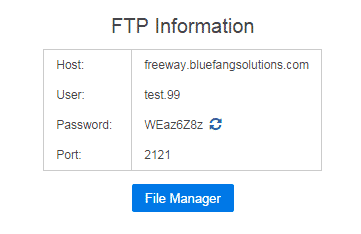
- Username (Your FTP username that you use to connect to your server files remotely)
- Password (The password for your FTP access and yours alone. Nobody else will ever see this password, not even your sub-users.)
- Port (The port you need for the FTP access)
- Recycle Button (Press this for an automatically generated new FTP password)
- “File Manager” (This takes you to our built-in file manager application. Use this if you don’t want to use a third party program like FileZilla or WinSCP)
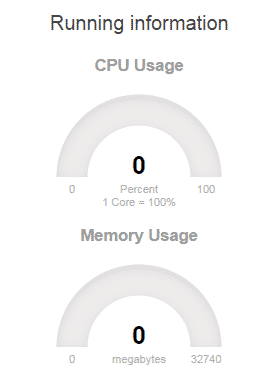 CPU Usage (The percentage of cpu utilization your game server process is utilizing, 100% = 1 core, 200% = 2 cores, etc…)
- Memory Usage (The amount of memory in MB being utilized by your game server process)
- Username (The username of the person you added to your sub-users)

- FTP (If this box is check-marked that user will have FTP access)
- DB (If this box is check-marked that user will have Database access – for certain games only)
- Email (Once the user has registered an account on the website you can add him/her as a sub user by using the email address he/she registered with.)
We hope you enjoy the panel in its current state. Please be aware that this is a live beta version and is in no way, shape, or form the final product. We will be constantly adding and changing things. We also want your feedback about anything and everything regarding features and layout. If you are a current customer of ours (or previous) and want to make use of this new software let us know by submitting a support ticket.
Changes to Advanced DDoS Filtering
[UPDATE – 1:07AM EST 9/20/2014] No solution was able to be provided by our ISP in Dallas, TX regarding the Layer 7 filtering. We have initiated emergency maintenance in Dallas, TX to remove Layer 7 filtered IP addresses and we are assigning new IP addresses to customers on these IP addresses. Please check your GameCP (Overseer Panel) to see your new IP address.
If you are a customer of ours in Dallas, TX or you were planning to move your services there you may want to read this. We will most likely be changing and/or completely removing the Layer 7 filtering for our DDoS protection in Dallas, TX. Some of the recent scrubbing changes made by our up-stream provider has started causing wide spread connectivity issues to all services in the location. The basic DDoS protection will still be in place but this change, if it does happen, will require all of our customers using the DDoS protected IP addresses to be moved to a new IP address as the routing for the current IP’s cannot be modified from their current state.
To put this in more simple terms to explain what is going on we can break it down like this; We currently run multiple services in our Dallas, TX location. The basic DDoS protection filters out most TCP traffic but game servers and voice servers like TeamSpeak 3 use UDP to allow users to connect. The Layer 7 protection is too aggressive against UDP connections and that is what is causing connectivity loss and service drops.
When we implemented Layer 7 advanced DDoS protection everything was working perfectly for some time and all of the filtering was allowing legitimate traffic through while at the same time blocking attacking IP addresses. In its current state, the advanced filtering is now way too aggressive and it needs to be scaled back some as it has continually been blocking legitimate traffic. If you are in our Dallas, TX location you understand our frustration as you constantly get dropped from your services and cannot FTP into your server files. This is totally unacceptable in our eyes.
We have already been hounding our up-stream provider in Dallas, TX to provide us with a solution to these filtering problems for the last few days and they have not been able to provide us with any sort of solution thus far. This unfortunately is why we are letting you, the customer, know what is going on and what we are doing to provide an alternative. The worst case scenario is that we move everyone in Dallas, TX to new IP addresses under the basic DDoS protection with Layer 3 and 4 filtering instead of Layer 7. Our ISP in Dallas, TX has also agreed to block specific ports that will not leave customers’ services vulnerable to attack if we need to take this route.
If you have any further questions or concerns regarding this situation please let us know by submitting a support ticket and we will do our best to work with you. We hope we can find a solution to these issues within the next few days. If no solution to the filtering issues is found we will move forward with our plan to lower the advanced filtering settings to level 3 or 4 and distribute new IP addresses to everyone in Dallas, TX.
TL;DR DDoS protection in Dallas is having issues and we are working to provide an alternative solution. Possible that all customers in Dallas, TX will be migrated off current DDoS protected network to new, less aggressive, protected network. Submit a ticket with any questions.
Our First Official Blog Post!
It has been 3 years now that we have been in business and we never really thought to create a place where we can post our thoughts and happenings about things abroad and within BFS. We now think we should have a place like that and where better to have it than right here on our website! This news blog will contain some of the latest news and announcements from Blue Fang Solutions, LLC as well as international and domestic events pertaining to the gaming industry (and rarely outside of that).
So lets get started shall we? Stay tuned!